I found really good program to clean up sims3packs on modthesims
Custard tool by Delphy
- !!! I EDITED THIS POST ON THE BOTTOM OF THE PAGE WITH NEW VERSION OF CUSTARD TOOL !!!
It can check if sims3packs are broken, wrong downloaded, content some bad files inside. Corrupted files can mess your game, make it slow or unplayable. I love to download custom content to the sims 3 game and I can't imagine to not check every file that I am downloading with Custard or with Dashboard tool (to check mods also made by Delphy on mts). It is too big risk because many files are made wrong by creators also there is many bad files on exchange. The easiest way to avoid bad files is not to download custom content ;) but if you are an addict like me you need to learn how to protect your game from unwanted files.
First what you should do is to download this tool from modthesims:
(registration is required) follow the installation steps that Delphy wrote there.
You will need framework to use this program. For those who use mods probably they have framework already in the game.
Here you can download program also from modthesims and it will install framework automatically:
It is test version and Delphy is still working on it. If you have any problems and questions about it write comment under link to this program on modthesims.
With this program I am checking if custom content (sims3packs) that I am downloading from sim sites are broken.
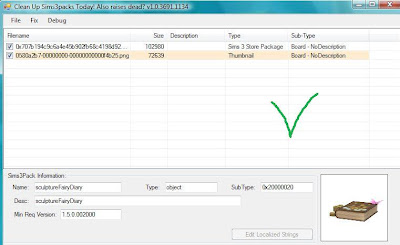
You need to open this program. It look like this:
This you should see when you check any sims3pack file. This file is not broken.
You should be interested in 2 columns. Type and Sub-Type
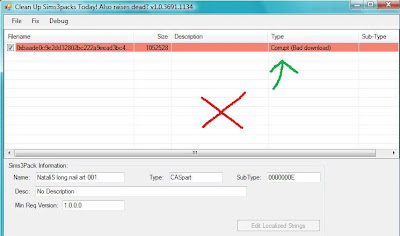
 This file is bad downloaded.
 You can try download again. You can see red line and in Type column is description: Corrupt (Bad download)
 This file is corrupted.
 Type: Corrupt (TXTC) You can try to fix it with option FIX but this program is still in test version so I have notice sometimes fixing is not helping. Personally I am not putting corrupted items into the game.
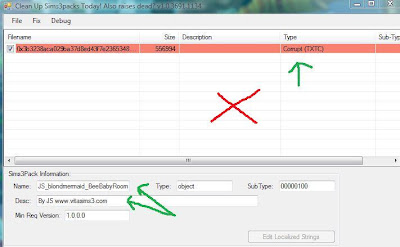
You can also see name of the file and who made the file. This item is from BeeBabyRoom made by vitasims.
I advice you to remove any corrupted items from the game or if you didn't put it yet to not install it.
Now what to do if you downloaded something from exchange like sim or house and there are some items that you don't want to install into your game.
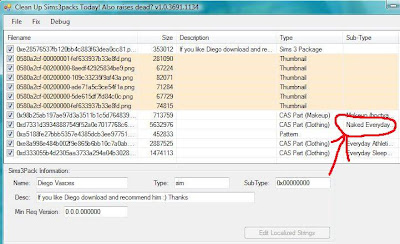
Lets see some sim from exchange. I have here example of sim with naked bottoms. If you don't want to see sims walking in your city naked the best way is to remove this content from sims3pack file. It's very common problem from exchange.
This is picture of the sim file. You can see thumbnail (pictures the same that you see on exchange) and under pictures are all custom content files that are included with this sim and naked bottoms or tops.
Here is another problem that you can get from exchange.
It is very creepy doll. It was originally made by one creator from the sims resource. If you are having this doll (her 1 version) in your game (check in kids section in toys) she will attach to every your house, household, patterns, objects, clothes tattoos that you upload to exchange and other people will have it too and give to others. Just like virus.
For some people this doll will not make harm in game for others will do. I was this other example.
Here is the picture of the doll:
This doll is fine now on the sims resource, only first version was broken. But I have notice that this doll is attached to too many items on exchange. So check everything that you download to protect your game.
This how the doll look in installed content in launcher:
If you want sim or house without custom content or without some single item (like this naked bottom or doll) just
untick on the right side everything that you don't want (1).
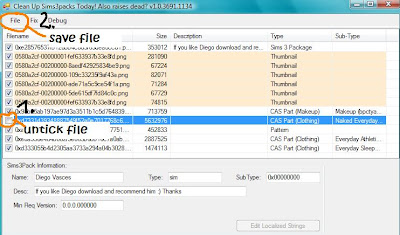
And then click File (2) and then "save".
I think that is everything what I can say about this tool. I hope you can find it useful.
Happy simming without broken and unwanted content :D
glitzyangel
EDIT: ABOUT THE DOLL AND HOW TO REMOVE IT
1. make backup of your game just in case if something will go wrong. For most of the people this doll is removed successfully without problems.
2. check if this doll is not in your houses as a toy or it's not in your kids inventory
3. go to install content in your launcher (not downloads) and look for the doll and uninstall it
4. check in DCBackups (my documents/Electronic Arts/The Sims 3/DCBackup)
for this file
0x038a68fe04da61a6aa65f939d77fbc37.package
and delete it too.
5. check also your downloads because there was the place from where the doll was nstalled to the game (if it was originally downloaded from tsr or from the exchange with some file)
6. also go to your Export folder (my documents/Electronic Arts/The Sims 3/Exports) if you sent something recently to exchange. Because this doll is attaching to the files. It will be in your uploads too. Remove files or clean it with Custard tool. (untick the doll)
7. check all your creations that's are in your studio on exchange or on other pages that you sent something too. If they have the doll remove it
For more informations and help about Custard tool visit Crinrict Help Blog:
http://crinrict-help.blogspot.com/search/label/Custard
EDIT 10.10.2012
There is NEW (BUT NOT THAT NEW I JUST DIDN'T MENTION IT BEFORE)
TEST VERSION OF CUSTARD TOOL
look for it on page 9 in Custard thread
HERE
Read from page 8 comments because they can help you understand how this new version work. It is nearly all the same but it is showing if there are some "extra" files attached that shouldn't be there (they can be corrupted).
Previous Custard wasn't showing that.
For example look at this photo:
You can see that first line is red and marked as Corrupt. In Sub-Type you have message that: "This package contains another package inside it". It mean that some cc is hidden there and personally I wouldn't download this sim, pet, house etc.
Another good thing is that new version of Custard is showing for example corrupted clothes if they were made for the wrong age. Like adult clothes that could be worn by babies and toddlers and they were making them look like a monsters.
The only thing that is not working good is that nearly all items downloaded from the exchange are marked now as corrupted including thumbnails. Even if item is clean without cc or attached unwanted items.
For me it is one more reason to not use exchange (to download items, well it wasn't my favourite place since beginning).
Anyway
Custard still is working good when you want to check any other downloaded custom content - of course - not from the exchange.


